PoMM User's Manual
Module Overview
Purpose of the Policy Making Module
The objective of the Policy-Making Module (PoMM) is to enable users to analyze the impact of changes in the policies related to the adoption of NBS and hybrid NBS for mitigation of CECs from urban runoff, hence enabling users on both science and policy sides to devise what changes would be more effective.
In order to link the PoMM to real-world applications, this general objective is grounded into three specific objectives enabling decision makers to explore, in a given context, the best ways
- to include NBSs among customary or preferred solutions in spatial planning;
- to include CECs in water monitoring plans;
- to develop a pilot management plan of CECs from urban runoff that includes hybrid NBS solutions.
To make all this possible the PoMM hinges on three pivots:
- Knowledge representation,
- Policy / decision case definition (mapping of case playground),
- Questioning, analysis of the outcomes of modelling/simulations, reporting for decision.
Who is the PoMM intended for
The PoMM is specially conceived for decision-makers and policy-makers who are involved (or might be involved) in the formation of policies and rulemaking about the adoption of hNBS for the mitigation of runoff CECs.
Intended users of the PoMM include
- Policymakers-rulemakers at town, province, regional level
- Bureaucratic and administrative agents (includng controlling and permitting bodies)
- Politicians
- Planners
- Scientists
From the PoMM viewpoint, user categories are not linked to the actual role played by a user in real-life (a user can play any role, real or fictional). Having this in mind, the PoMM is applicable to both actual and potential situations.
Key functionalities
The key functionalities of the PoMM module are described in the following table:
| Submodule/Functionality | Description |
|---|---|
| Knowledge representation | includes the terminology service which assures a common understanding across all PoMM parts, the information stored about the cases under study, and the guidelines for the different types of experiments |
| Policy / decision case definition (mapping of case playground) | includes the tools to describe the case under study in which PoMM experiments take place, to formalize the existing decision-making and policy-making procedures, information flows, and practices following the Business Process Model and Notation (BPMN), and to assign the set of CECs and hNBSs considered. |
| Questioning, analysis and reporting for decision support | includes the tools and interfaces to transform a research question into a PoMM query by designing experiments, then analyzing the outputs obtained. Reporting encompasses the tools to communicate the results in ways suitable for the intended targets. |
How to access the PoMM
You can access the PoMM module via the AI-DSS Platform following general login instructions and pressing the appropriate link on the platform's side menu.
User System / Device requirements [TO BE REVIEWED]
A matter of privacy
After following the link on the platform's side menu to access the module, yor are asked again to accept a specific privacy policy concerning your information and its handling in the PoMM [Fig. 01].

PoMM does not store user data, including uploaded files, configurations, models, simulations, or reports, beyond the duration of the active session. Once the session ends, all data will be permanently deleted from the platform's servers.
It is your sole responsibility to download and securely save any data, reports, or configurations generated or uploaded during the session. KLINK SRL is not liable for any loss of data due to failure to download or save session outputs.
While the PoMM platform implements standard security measures to protect active session data, users are advised to avoid uploading sensitive or confidential information.
If you do not agree to the policy conditions, you areredirected to the public area of the Help section of the module.
Strike the right button
The module offers a wide variety of specific features all geared towards making your journey as satisfying and useful as possible.
It is important to strike the right button to start with! [Fig. 02]

- Start New Session: Begin a new policy modelling session from scratch.
- Restore Session: Resume a previously saved modelling session.
- Process templates: Decide your strategy answering some questions to start with a pre-configured process template.
- Agents simulation: Proceed with the Agent Based Simulation.
- Thesaurus & Vocabulary: Access the standardized terminology and definitions.
- Help & User's Guide: Access comprehensive documentation and user guides.
Brief flow of operations
The flow that users follow in the PoMM goes through 5 main steps:
- description of the case under study defining what the starting experimental context looks like with respect to the objectives to investigate (i.e.: to include NBSs among customary or preferred solutions in spatial planning; to include CECs in water monitoring plans; to develop a pilot management plan of CECs from urban runoff that includes hybrid NBS solutions)
- definition of an intervention to influence the baseline context in order to facilitate the achievement of one's goal (where should/can I act? how?)
- analysis of the outcomes of the experiment performed (how does the hypothesised intervention change my initial context? what are the results obtained? am I closer to my goal?)
- documentation and sharing of results (how do I document and share the results of my experiment with other interested stakeholders?)
- overcoming doubts and obstacles in experimentation (what tools do I have to deepen and reduce the risk of language ambiguity/equivocality across different knowledge domains and fields of practice involved in my experiment?)
Difference between network modelling and agent based modelling
There are two main modelling approaches in PoMM:
- a network modelling approach used to mapping out the relationships among variables that affect CEC-NBS decisions in a real-world procedural decision-making process to reveal the overall structure of the system, observe how the system behaves without any intervention, define what are the interventions needed to change the final state of the system to own advantage;
- an agent based modelling approach simulating the actions and interactions of individual "agents" (could be different stakeholders but also NBS solutions) within the system to explore what behaviour could emerge as a response to pollution risks, floodings, etc. It's like creating a virtual world where watching how individual behaviors add up to create larger and complex patterns.
By combining them, users can create models that are both cognitively realistic and dynamically rich and this is particularly valuable for studying complex systems, as in the case of the use of NBS solutions to mitigate the pollution effects of CEC contaminants from urban runoff phenomena.
The network modelling approach provide the "cognitive" framework, the understanding of how factors interrelate and helps to understand where to intervene.
The ABM approach provides the "behavioral" framework, the simulation of how agents act and allows to explore and compare the sentiment and social response to NBS for CECs depending on factors like front and maintenance cost, risk-mitigating capacity, etc.
Knowledge representation
The first pivot of the PoMM module is knowledge representation.
We aimed to create clear, machine-readable definitions for key terms, establishing logical connections within the PoMM framework and simulations. This minimizes misunderstandings caused by differing interpretations of language across the various fields involved in D4RUNOFF.
Activities like CEC characterization, NBS classification, policy-making guidelines intersect on the same case from different perspectives and with diverse vocabularies.
Sometimes the meaning of important terms that we use are confusing (multiple meanings depending on context or user, or synonyms) or a term is authoritatively defined somewhere, but its definition does not fit well with our shared domain.
Terminology (vocabulary, thesaurus and ontology)
The D4Runoff Thesaurs is a controlled and structured vocabulary, related to the domain the project deals with in, which concepts are represented by terms, organized so that relationships between concepts are made explicit. The D4RUNOFF Thesaurus:

- Ensures everyone understands the information structure (common meaning).
- Clearly states the assumptions made about the subject.
- Checks that the subject information is consistent (verifies accuracy).
- Allows the subject information to be used again in different ways.
- Separates subject knowledge from how it's used.
- Simplifies searches and makes it easier to find information.
You can access the Thesaurus by simply clicking on the button on the main menu: a new browser window will open, allowing you to have the main definitions at your fingertips so that you can better understand how to design your case study [Fig. 03].

What you can do
The use of the vocabulary/thesaurus is very intuitive.
On the main page [Fig. 04] you can find:
- a bar on which to write the term you want to search for
- an alphabetical list on which you can click to search
- a list of main contents at your immediate disposal that help you understand some of the most relevant elements which represent the scope of analysis of PoMM or are useful for your experiments
- a link to an advanced search.
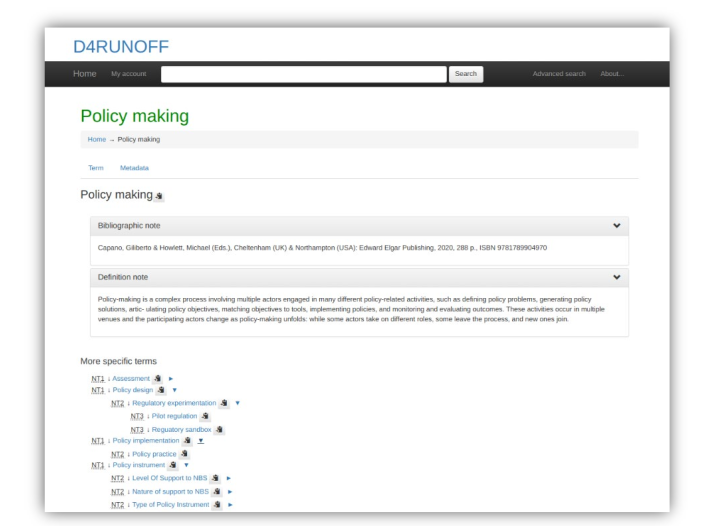
Fig. 05 - Example of a concept of the Thesaurus and its relationship

Note that the "My Account link" on the navigating bar is only available to system administrators and not to users.
The interface [Fig. 05] allows you to:
- see the description of each search term
- read definitions and bibliographical notes
- directly access other terms related to the entry you searched with more specific, broader, equivalent, preferred or semantically related meaning.
Note that the interface is multilingual but the contents are in English.
In the same screen different kinds of relationships are displayed allowing you to move easily from one term to another via the different links.
There are different kind of relationships you can find in the D4Runoff thesaurus that can include:

There are different kind of relationships you can find in the D4Runoff thesaurus that can include:
- hierarchical relationships such as broader term (BT) and narrower term (NT). These terms denote relationships between the concepts (not the terms) and indicate whether a concept contains or is contained by another concept. Hierarchical relationships can be used to broaden and narrow a search effectively and ensure that narrower terms fall within the scope of the broader terms;
- equivalence relationships such USE and UF (Use For). They are used to denote equivalence between terms (not concepts) and to distinguish between preferred terms and their synonyms (a term, which has the same meaning or covers the same concept as another term or multiple terms) or quasi-synonyms (a term that does not usually have the same meaning as the preferred term but does in the context of a specific thesaurus) [Fig. 06];
- associative relationships such as related terms (RTs). They are used to indicate that different terms in a thesaurus are related in some way or have an overlapping scope. They thus allow users to expand their initial search into different aspects of the subject.

The advanced search [Fig. 07] allows you to navigate the Thesaurus also, for example, from the notes that have been associated with each term, doing your own free search.

The Thesaurus is linked to qualified sources and validated vocabularies
- EUROVOC: a multilingual thesaurus (controlled vocabulary) maintained by the Publications Office of the European Union, used by the European Parliament, the Publications Office of the European Union, the national and regional parliaments in Europe, some national government departments, and other European organisations [Fig. 08]
- AGROVOC: a multilingual controlled vocabulary covering all areas of interest of the Food and Agriculture Organization of the United Nations (FAO), including food, nutrition, agriculture, fisheries, forestry and the environment.
- GEMET - GEneral Multilingual Environmental Thesaurus: a source of common and relevant terminology used under the ever-growing environmental agenda that has been developed since 1995 as an indexing, retrieval and control tool for the European Topic Centre on Catalogue of Data Sources (ETC/CDS) and the European Environment Agency (EEA), Copenhagen.
- EARTh - Environmental Applications Reference Thesaurus: represents a general- purpose thesaurus for the environment. It promises to become a core tool for indexing and discovering environmental resources by refining and extending GEMET.
Knowledge repository
The PoMM knowledge repository (help, user's manuals, technical documentation) has been organised as a semantic-rich website.
It was developed on the basis of the Mediawiki platform, an extremely powerful and scalable software, which enables the implementation of feature-rich wikis and allows you to move freely between contents depending on your qualification as a user. [Fig. 09]
What you can do
On the main page, any visitor can access the main content and information.

From this page it is possible to reach every area of the help feature.
If you are a registered user, you can access a restricted area that contains the Comprehensive Knowledge Base and Full Documentation and allows to:
- access the FAQ system and specific tutorials
- analyse case studies (including D4Runoff pilot sites) and applications of PoMM in other contexts
- deepen the policy scenario
- deepen the underlying principles, mechanisms, and technology choices incorporating the theoretical body of knowledge that supports PoMM operation
- access targeted bibliographies and other useful resources
- access technical documentation about the technology, architecture, core modules and interconnections.
Policy / decision case definition
In the PoMM, you build policy scenarios to map out the steps involved in making decisions that affect well focused central issues in order to operationalize the exploration, design and analysis of changes in the policies related to the adoption of NBS and hybrid NBS for mitigation of CECs from urban runoff.
The first step is to understand how things work today (the baseline). Essentially, it's a way to visualize "your world" in relation to the relevant policy-making cases as it is, to create the ‘laboratory’ of the experiment, that is to map the framework of the case under study, in order to obtain the baseline (BAU, current state, do-nothing) scenario.

Typically, the definition of the policy/decision case starts with network modelling.
Procedural description (network modelling) of the case
To outline your case you have to start a new session from scratch. From the main menu choose |Start new session| [Fig. 010] and following the steps below.
From the main menu choose |Start new session| [Fig. 010] and following the steps below.
(1) Defining the geographic boundaries of your physical system
| Select the NUTS level to which your analysis relates | |
| NUTS (stands for Nomenclature of Territorial Units for Statistics) are statistical codes to define a geographical area in the European Union. The NUTS system divides each EU country into three levels: NUTS 1 (Major socio-economic regions); NUTS 2 (Basic regions for the application of regional policies); NUTS 3: Small regions for specific diagnoses. [Fig. 011] |  |
| You can change the NUTS map display level in the top right of the screen and then directly select your area from the map of Europe on the left of the screen.
You can zoom on the map for better resolution. [Fig. 012] |
 |
| Most PoMM analyses will be probably reflected in NUTS 2 or NUTS 3 level areas.
If you select NUTS 3 level, you can also choose Local administrative units (LAU) from the contextual drop-down menu. [Fig. 013] |
 |
| Once the NUTS/LAU is selected, confirm selection to confirm LAU code, if needed. [Fig. 014] |  |
| Press |Next ->| to complete the geographical information. [Fig.015]
If you realise you have made a mistake, you can go back and change your choice clicking on |<- Back| . The geographical boudaries of your system is now completed. |
 |